AI research canvas · Free to start with 300 credits
Research that ends in a document, not an endless chat.
Ask from any sentence, follow each lead on its own branch, and pull the best into a document that cites its sources.
- No card needed
- Every quote links to its source
- Import your ChatGPT chats
- Works on your phone
Branch out, then bring it together
Animated example: a question about why the Roman Republic collapsed, and its answer. Two phrases in the answer are selected and asked about, and a new branch is started from the node’s menu, so three linked cards open beside it and answer. A line from each is then carried into a document, with a numbered citation back to the card it came from.
Ask about any line, branch on every lead, then pull what each branch found into one cited doc.
Long AI chats bury your best answers.
Ask a follow-up and the answer you needed scrolls out of sight. Offshoot gives every question its own place, so you can chase a tangent and still find your way back.
A typical chat app
- One endless scroll. The answer you needed is far above.
- Every tangent pushes the main thread out of sight.
- Going back means editing a message and losing sight of what followed.
- Notes live in another app.
- You repeat your instructions in every chat.
- One provider, one subscription.
- The final output is whatever the last reply said.
Offshoot
- A canvas of connected answers you can see at a glance.
- Each tangent gets its own node, linked to the line it came from.
- Branch from any node and keep everything before it.
- Highlights and notes sit on the sentence they belong to.
- Write a context once and attach it to any question.
- Hundreds of text and image models, one credit balance.
- You leave with a document built from what you kept.
This is the actual app.
No mockups. Read with highlights and notes, pick the right model, check the sources, zoom out to the whole tree, and write with citations.
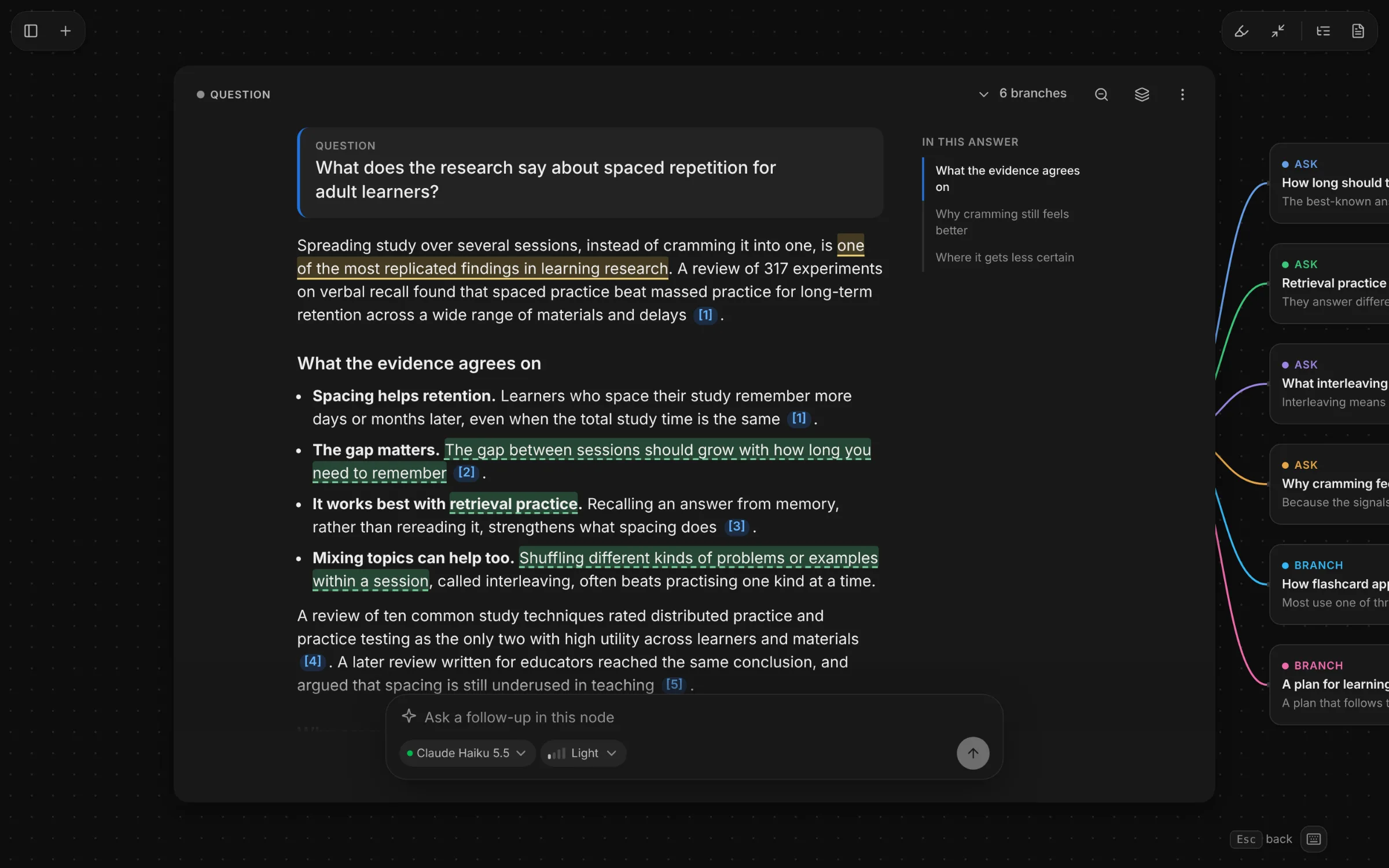
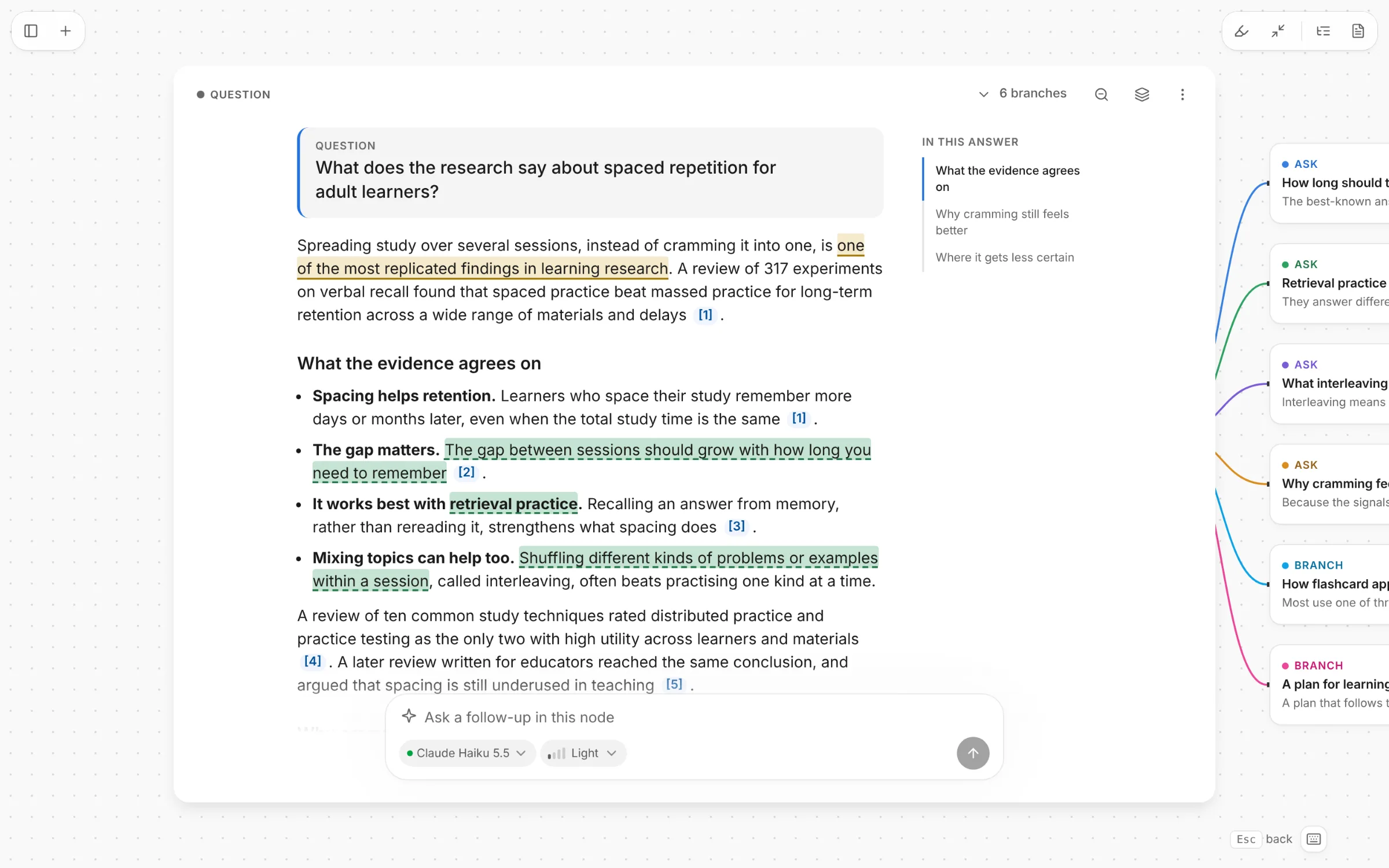
Answers read like a document, with an outline beside long ones. Highlights, notes and follow-ups stay pinned to the line they came from.
Pick up where you left off
Already started in ChatGPT or Claude? Bring it with you.
Copy the prompt Offshoot gives you into ChatGPT or Claude, then paste its reply back. Research you left unfinished becomes a canvas, every lead you never followed becomes a branch, and what the assistant knew about you becomes a context.
Import a chatFrom one question to a finished doc.
It's the chat you already know, with room for every answer to grow. Here is the whole loop.
How does CRISPR base editing differ from classic Cas9 cutting?
Base editors rewrite a single letter of DNA without cutting both strands. Classic Cas9 makes a double-strand break and leaves the repair to the cell, which causes more unwanted edits.
Off-target edits drop sharply with base editing. Bystander edits inside the editing window remain the main safety concern, and delivery to target tissue is still the bottleneck for therapies.
Note
Check the delivery numbers against chapter 3 before the advisor meeting.
Base editing, explained
PDF · MarkdownBase editors chemically convert a single letter of DNA without cutting both strands.1
How does CRISPR base editing differ from classic Cas9 cutting?
Claude Sonnet 5.5 StandardTextImageStep 1 of 5
Start with one question
Pick a text or image model, see how hard it will think, and attach a saved context so the answer knows who it’s for.
Base editors rewrite a single letter of DNA without cutting both strands. Classic Cas9 makes a double-strand break and leaves the repair to the cell, which causes more unwanted edits.
Step 2 of 5
Select any line to go deeper
Highlight a phrase and press A, or tap Ask. A new node opens beside it, pinned to that exact line.
- B branchZ overview
Step 3 of 5
Branch, then zoom out
Press B to fork a new direction without touching the original. Press Z to see the whole tree. Esc takes you back.
Off-target edits drop sharply with base editing. Bystander edits inside the editing window remain the main safety concern, and delivery to target tissue is still the bottleneck for therapies.
Note
Check the delivery numbers against chapter 3 before the advisor meeting.
12 highlights, 4 notesStep 4 of 5
Capture as you read
Highlight what matters and pin notes to sentences. Every highlight and note collects on one page and jumps back to its source.
Base editing, explained
PDF · MarkdownBase editors chemically convert a single letter of DNA without cutting both strands.1
Step 5 of 5
Write the doc
Add the passages you kept and write around them. Review AI rewrites paragraph by paragraph, then copy it into Google Docs or Notion with formatting, or save it as Markdown or PDF.
A document that keeps up with your research.
Every canvas has a document beside it. Send it the lines worth keeping, then write around them the way you would in a notes app: format as you type, reach for anything with /, and drop in figures.
Add to Doc, with receipts
Select a line on any card and send it to the document. It keeps a numbered citation back to its card, so every claim can be checked where it came from.
Formatting on the selection
Select text for a small bar: text style, bold, italic, underline, strikethrough and links. Type # for a heading or - for a list without leaving the keyboard.
Type / for anything
Headings, lists, checklists, quotes, dividers and images, from wherever the cursor is.
Figures, made or brought along
Describe a figure and AI draws it into the document. An image you made on the canvas goes in with Add to Doc, and your own with Upload.
Take it anywhere
Copy into Google Docs or Notion with formatting and citations kept, or save Markdown or a PDF.
Rewrites you review, paragraph by paragraph
Grammar check, polish, tighten, expand or simplify what you wrote. Each changed paragraph shows the original and the rewrite, one above the other: keep one or accept the other. Quoted passages are never rewritten, so their citations stay true.
Everything a deep session needs.
Small, sharp tools that stay out of the way until you reach for them.
Hundreds of models, one balance
Text and image models from OpenAI, Anthropic, Google, DeepSeek, Perplexity, Moonshot AI and more, all paid from one credit balance.
Text node
What would a coral reef look like at 2°C of warming?
Image node
Now show it at dusk, from below
Answers with sources
Web-search models cite as they go, with numbered sources you can click. Math is typeset, and drawings show as pictures.
Contexts you write once
Save up to 8,000 characters of standing instructions: your role, your audience, your style. Every branch from that question keeps it.
Built for the keyboard:Z OverviewB BranchA AskH HighlightEsc Back? for the rest
Works on a laptop or a phone, in light or dark.
Built for people who go down rabbit holes for a living.
Pick a role to see how one question turns into a map, and what you leave with.
Compare options side by side before you commit.
Should we build or buy a feature-flag system?
Building is cheap to start, but the total cost of ownership grows with every team that relies on it. Buying is faster, at the price of vendor lock-in once flags spread through the code. Most teams buy, then outgrow it or don’t.
- Ask
What does building it cost after year one?
Audit logs, targeting rules and on-call add up…
- Ask
How hard is it to leave a vendor?
Flags live in every service, so moving means…
- Branch1
Make the case for building it in-house
When flags are core to how you ship…
AskNow draft the decision memo
Option A, option B, and what would change…
You leave with a decision memo with each option explored on its own branch.
Start free. Pay only when you go deeper.
One credit balance across every model. Unused plan credits roll over for a month and top-ups last a year, so a quiet month isn't wasted.
Free
$0
- Credits
- 300 to start, then 20 a day after you verify your email
- Thinking level
- Light
Plus
$8a month
or $79 a year ($6.58 a month), save 18%
- Credits
- 3,000 a month
- Thinking level
- Standard
Pro
$20a month
or $192 a year ($16 a month), save 20%
- Credits
- 10,000 a month
- Thinking level
- Standard
Max
$50a month
or $480 a year ($40 a month), save 20%
- Credits
- 25,000 a month
- Thinking level
- Choose any level per question
What an answer costs
Every model has a class, shown in the model picker before you send. A typical answer costs:
- Ecounder 2 creditsGPT-6 Luna, Claude Haiku 5.5, DeepSeek V4 Flash
- Standard2 to 10 creditsGemini 3.8 Flash, GPT 5.4 Mini, Kimi K2.6
- Frontier10 to 40 creditsClaude Sonnet 5.5, GPT-6 Sol, Claude Opus 5.5
- Flagship40 to 100 creditsClaude Fable 5.1, GPT-6 Astra
- Ultra100+ creditso3 Pro, GPT 5.5 Pro · Pro and Max plans
Invite a friend. You both get 300 credits once your friend verifies their email and asks their first question.
Questions, answered.
The short version: it’s the AI chat you know, with room to go deep and a doc at the end.
What is Offshoot?
An AI research canvas. You ask a question, follow any line of the answer on its own branch, and turn the parts worth keeping into a document.
How is it different from ChatGPT or Claude?
A chat is one scroll, and a fork button just starts a second one. Offshoot keeps every branch on one canvas, pinned to the line it came from, and ends in a doc you can export.
Which models can I use?
Hundreds of text and image models from OpenAI, Anthropic, Google, DeepSeek, Perplexity, Moonshot AI and more, all from one credit balance.
What are thinking levels?
How hard a model reasons before it answers: Light, Standard, Deep or Max. Free uses Light, Plus and Pro use Standard, and Max lets you choose for each question.
Do answers cite sources?
Web-search models cite as they go, with numbered sources. In your doc, every passage links back to the branch it came from.
Can I make and edit images?
Yes. Describe an image and it appears on the canvas as its own node. Ask a follow-up to change it, or type / in your doc to add a figure.
Can I bring in my ChatGPT or Claude chats?
Yes. Copy the prompt Offshoot gives you into ChatGPT or Claude and paste its reply back. Unfinished research becomes a canvas, open leads become branches, and what the assistant knew about you becomes a context.
What are contexts?
Standing instructions of up to 8,000 characters, like your role or the style you want. Attach one to a question and every branch keeps it.
How do I get my work out?
Copy into Google Docs or Notion with formatting and citations kept, or save as Markdown or PDF.
Does it work on my phone?
Yes, on any screen, in light or dark. Every action works from the keyboard and with a screen reader, and animations calm down when you ask for reduced motion.
What happens to my data?
We don’t sell it. To answer you, Offshoot sends your question and the context it needs to the model’s provider through the Vercel AI Gateway. Deleting a conversation deletes its nodes, highlights, notes, document, and images. Credit and usage records keep models, token counts, and costs, never what you wrote. The privacy page has the details.
Can I invite a friend?
Yes. Copy your invite link from Invite a friend in your profile menu, or from Settings → Billing. You both get 300 credits once your friend verifies their email and asks their first question. The credits last 14 days.
What does it cost?
Free to start with 300 credits, and 20 more a day once you verify your email. Paid plans start at $8 a month, and their unused credits roll over for a month.
Your next rabbit hole deserves a map.
Ask your first question and come out the other side with a doc. Free to start, no card needed.